Installing the app
Whose build you can trust decides how you install it. The less you trust, the more you have to provide yourself.
Threats
| Threat | For example | Ways that avoid it |
|---|---|---|
| The place it is served from is taken over | GitHub Pages or the repository is altered, or you are sent to a fake site | Your own Pages, the release, your own build |
| The release is replaced | The author's account or signing key is stolen | Your own build |
| The PC used to install is compromised | Malware on the PC or in its browser changes what gets installed | The web app (no PC). With Lockdown's QR code the PC only shows it, and the release decides what it holds |
| The build's ingredients are compromised | Rust or npm dependencies, the build tools | Read the source and build it yourself (you still trust the ingredients) |
What the signer provides
- Four ways to get it: this site, your own Pages, the author's release and your own build. Each one further along trusts fewer parties.
- Signed releases and
SHA256SUMS: release APKs are signed with the author's key.SHA256SUMSshows that the download is intact, but cannot catch a release that was replaced as a whole. Once installed, Android only accepts updates signed with the same key. - Checking the WASM's SHA-256: the APK and the iOS app do not run if the signing engine they load has a different SHA-256. In the web app the checking code comes from the site too, so it cannot catch a replaced site.
- Build names: in the web app, Settings › This build shows the running build. Built by GitHub Actions, the same commit gives the same name, so you can compare it with "Web app build" in the release notes. A build on another kind of machine, such as a Mac, does not match.
Choosing by what you trust
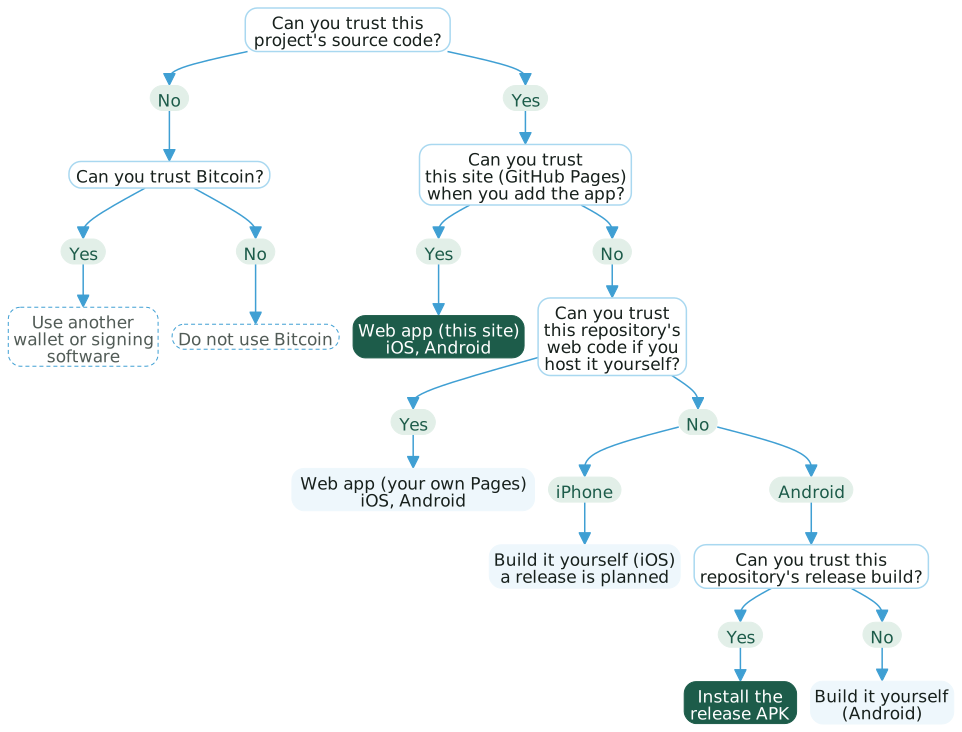
The web app's code is the same whoever serves it; only who serves it differs. Only when you cannot trust that does the kind of phone matter. Whether you can trust the phone's other apps is decided by how you use it, not by how you install it.
What each way trusts
Every way trusts this repository's code and the OS. ● trusted, △ trusted in some cases, — not needed.
| Web app (this site) | Web app (your own Pages) | Build it yourself (iOS) | Build it yourself (Android) | The release APK | |
|---|---|---|---|---|---|
| This site | ● | — | — | — | — |
| The author's release | — | — | — | — | ● |
| Your GitHub and Actions | — | ● | — | — | — |
| Build tools | — | △*1 | ● | ● | — |
| PC used to install | — | — | ● | ● | ● |
| Installer page | — | — | — | △*2 | ● |
| Browser engine | ● | ● | △*3 | △*3 | △*3 |
| Online during setup | Yes | Yes | Sometimes | No | No |
| Effort | Low | Medium | High | High | Low |
| Tested | On a real iPhone | Not from a fork yet | Simulator only | On a real phone | On a real phone |
*1 GitHub's runners and the npm dependencies.
*2 When installing with "Install an APK only" on the installer page.
*3 The native apps draw their screens and take input in a WebView (WKWebView on iOS), so they trust the browser engine in part. The key and the signing engine stay on the native side. In the web app, the key and the engine run in the browser.
The installer page: the installer page writes to the phone over WebUSB from Chrome or Edge. While connected it can do anything adb can do to the phone. The page is built from this repository.
This site: the web app takes all its files from the site the first time it is opened from the home screen, then runs offline. You trust what the site served at that moment. Going online lets a new build arrive, which takes over when you go to the home screen and open the app again, so keep the phone offline once it is installed.
An APK you build yourself is signed with a different key from the author's release, so it cannot update a release install.
The steps are in the Quick start.